
Magic WOL for Windows Home Server
Note: This product is no longer officially supported. A free version of this product is now available for download here.
Magic WOL is available to try free for 30 days. Download Now |
Magic WOL is a clientless Wake On Lan solution for WHS V1. Utilizing the latest AJAX technology for seamless website interaction, Magic WOL is the easiest solution for waking up computers for RDP. Not only is it accessible from the WHS console and the remote website, but it easily allows you to manage devices in your network that are not connected to WHS.
Features:
- Clientless integration, only need server installation.
- IP Helpers and ARP finders that keep your PCs information accurate when WHS doesn’t.
- Edit, Delete, and Add new computers both connected and unjoined to WHS.
- Create WakeUp schedules for computers to wake up automatically at specified time.
- Automatic Updates for all future releases.
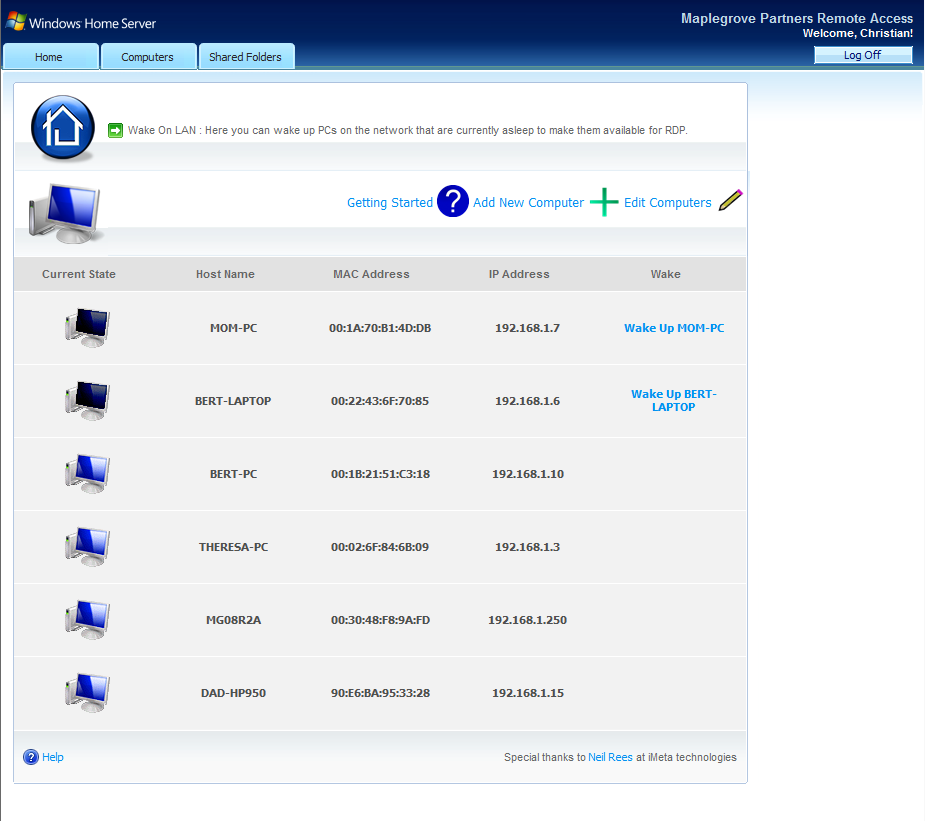 Magic WOL Web Support for this addin is available through sponsoring WHS forums where additional help and support is offered 24/7. You can always reach us directly through the contact form on the site for any questions regarding our products.
homeservershow.com
MediaSmartServer.net
To install the addin, place the MSI in your servers Addin folder and install it from your WHS console.
Please note, Wake On Lan is a technology that is not available on most wireless devices. For more information, please see the Getting Started documentation in the add-in.